
AI Generated Headshots for LinkedIn: The Smart, Fast Way to Look Pro
Let's be honest. If your LinkedIn photo is a cropped vacation pic or a blurry selfie, you're leaving opportunities on the table. In a world of instant impressions, your profile picture is your digital handshake—the very first thing recruiters, clients, and colleagues see. It sets the tone for your entire professional brand before they even read a single word.
A polished, professional headshot isn't just a nice-to-have; it's a critical tool for standing out.
Until now, the big hurdle was the hassle and cost of a traditional photoshoot. Finding a photographer, scheduling a session, and shelling out hundreds of dollars is a major investment of time and money.
This is where AI generated headshots for LinkedIn are a complete game-changer. For a fraction of the cost—we’re talking under $50—and in less time than a lunch break, you can get dozens of studio-quality LinkedIn portraits. It's the ultimate combination of convenience, affordability, and professional quality.
The New Standard for Your Professional Branding
AI headshot generators are leveling the playing field, making top-tier professional branding accessible to everyone, not just executives with a corporate budget. You get to take full control of your image without the friction. No more awkward photoshoots or waiting weeks for edits.
Here's why this approach is so powerful and friendly to your schedule and wallet:
-
Unbeatable Convenience: Generate dozens of headshots from the comfort of your couch using a handful of selfies from your phone. The entire process takes less than an hour, saving you precious time.
-
Incredibly Affordable: Forget the $250 to $500 price tag of a traditional shoot. Get a full gallery of options for a small, one-time fee, making professional branding accessible to everyone.
-
Stunning Professional Quality: Modern AI tools produce images that are virtually indistinguishable from a high-end studio session, perfecting the lighting, backgrounds, and even professional attire.
Just how much does a great headshot matter? The numbers speak for themselves. Profiles with professional headshots get up to 21 times more views.
What's really fascinating is how people perceive these images. Recent research shows that viewers see individuals with high-quality AI-generated headshots as 76% more competent and 62% more influential. When you're trying to stand out, that's a massive advantage. You can read the full research about AI headshot benefits to see why it's such a smart career move.
To put it all in perspective, here's how the two options stack up side-by-side.
Traditional Photoshoot vs AI Headshots at a Glance
| Factor | Traditional Photoshoot | AI Generated Headshots |
|---|---|---|
| Cost | $250 - $500+ | Under $50 |
| Time Investment | 3-5 hours (scheduling, travel, shoot) + weeks for edits | Under 1 hour (start to finish) |
| Convenience | Low - Requires scheduling and travel | High - Do it from anywhere, anytime |
| Variety | Limited (5-15 edited photos) | High (Dozens of styles & backgrounds) |
| Turnaround | Days or Weeks | Minutes |
The table makes it crystal clear. For most professionals looking to make a great impression on LinkedIn, the time and cost savings combined with the high quality of AI headshots are simply too good to ignore.
How to Take Selfies the AI Will Actually Love
The secret to a fantastic AI headshot isn’t a fancy camera—it’s the quality of the selfies you provide. Think of it as giving an artist a reference photo; the clearer the reference, the better the final portrait. The good news is, getting the right source images is simple and quick.
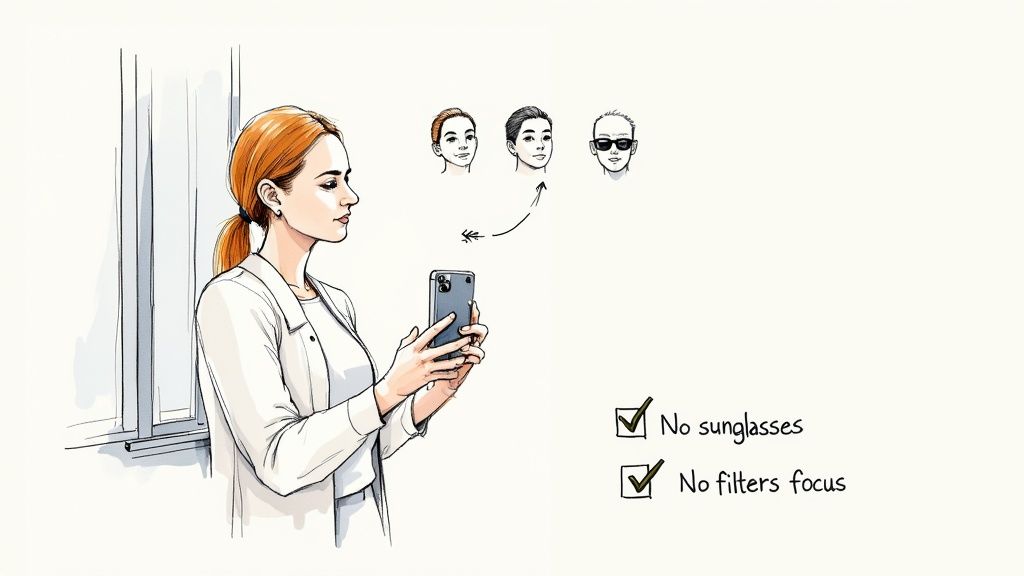
You can forget about complicated lighting setups. Your best friend is a window. Just stand facing it during the day to get soft, even, natural light across your face. This one simple trick eliminates harsh shadows and gives the AI a clean, well-lit canvas to work with.
Curate Your Expressions and Angles
Variety is absolutely key here. The AI needs a range of data points to understand your facial structure and generate realistic variations. Submitting ten photos of the exact same stiff smile won't give you the best results.
Instead, aim for a healthy mix that includes:
-
A confident, closed-mouth smile: Your classic, go-to professional look.
-
A genuine, teeth-showing smile: Conveys warmth and approachability.
-
A more serious, neutral expression: Perfect for more corporate or authoritative headshots.
-
Slightly different angles: Turn your head just a bit to the left or right in a few shots.
The goal is to give the AI a complete 3D model of you in its "mind." A diverse set of expressions gives it more creative freedom, resulting in a wider selection of high-quality LinkedIn portraits that truly look like you.
Putting in this small effort upfront pays off big time. By giving the AI more to work with, you massively increase the odds of getting that perfect shot on the first try.
Avoid These Common Photo Mistakes
Just as important as what to do is what not to do. Uploading the wrong kinds of photos is the fastest way to get disappointing or unrealistic results.
To ensure you get the best possible outcome, steer clear of these pitfalls:
-
No Sunglasses or Hats: The AI needs to see your eyes and hairline clearly.
-
Avoid Heavy Filters: Instagram or Snapchat filters warp your features and will confuse the AI.
-
Skip the Group Photos: It needs to be just you in the frame.
-
Ditch Blurry or Low-Light Images: The AI can't create a masterpiece from a blurry, dark photo.
Think of this as your pre-flight checklist. Taking a few extra minutes to capture clean, high-quality selfies will make all the difference. For an even deeper dive, you can learn more about taking the perfect photos for AI headshots and guarantee a great result.
Finding the Right AI Headshot Generator for You
The world of AI headshot tools has exploded, and sorting through them can feel overwhelming. They all promise professional quality, but the actual results, features, and experience can vary wildly.
Choosing the right one isn't about finding a single "best" tool, but about matching a service to your professional branding needs.
Think about your personal brand. Are you a finance professional who needs a classic, corporate look for your LinkedIn portrait? Or a creative who wants something with more personality? Start by scrolling through their example galleries to get a quick feel for their aesthetic.
Key Factors to Look For
Before uploading your selfies, take five minutes to vet any service you're considering. This upfront homework will save you from wasting time and money on a generator that isn’t the right fit.
Here’s a friendly checklist:
-
Realism and Quality: How believable are the final images? Look closely at their examples. Do you see plastic-looking skin or weird digital artifacts? The goal is a photo that looks like you on your best day, not a digital clone.
-
Variety of Styles: A solid generator should give you options. You want a good mix of backgrounds, outfits, and lighting setups. Services like HeadshotPro are known for a deep library of professional styles, giving you plenty of room to find the perfect look.
-
Data Privacy Policy: This is a huge deal. You’re handing over photos of your face, so you need to know how that data is being stored and used. Look for a clear policy stating they delete your images after a certain period (usually 30 days).
Your personal data is everything. If a service doesn't have a transparent, easy-to-find privacy policy, it's a red flag. This should be a non-negotiable for you.
Making a Smart, Affordable Investment
The popularity of these tools highlights a major shift in professional imaging. A traditional photoshoot is a significant investment, easily costing $200 or more. By comparison, you can get dozens of high-quality ai generated headshots for linkedin for under $50, often in less than an hour. That's a massive cost saving.
Platforms like Aragon AI and InstaHeadshots have opened up access to professional branding, letting you create a portfolio of looks from a few selfies. This trend is visibly impacting the job market on platforms like LinkedIn.
Ultimately, the best choice comes down to your priorities. If you need hyper-realistic images, it's worth paying a small premium for a service known for its advanced AI. By weighing realism, variety, privacy, and cost, you can pick a generator that delivers a polished, professional headshot that makes your investment worthwhile.
From AI Output to Your Perfect LinkedIn Profile Picture
Getting the email with your new batch of AI-generated photos is the fun part, but now the real work begins. You're shifting from generator to curator, sifting through options to find the one that will become your professional calling card on LinkedIn. The goal is to land on an image that projects competence, warmth, and authenticity.
Start by creating a "shortlist" of your top five or ten contenders. Look for shots where the lighting feels natural, your expression is confident yet approachable, and there are no strange digital artifacts—like misshapen glasses or an odd-looking earlobe.
Fine-Tuning Your Selection for LinkedIn
Once you have your favorites, think specifically about the LinkedIn platform. Your photo lives in a tiny circle, so it needs to be impactful at a glance. A headshot where your face fills a good portion of the frame will always beat a distant or full-body shot.
LinkedIn recommends a photo that's at least 400x400 pixels, but always use the highest resolution image the AI service provides. This keeps it looking crisp and clear on any device.
To make the selection process easier, think about it in these phases:
This flow helps you first check the technical quality, then align it with your professional brand, and finally, make a confident decision.
Cropping and Minor Retouching
Now, let's talk edits. The best ai generated headshots for linkedin need very little work. Your main job is cropping.
A great rule of thumb is to crop from the top of your head down to your collarbone. This composition puts all the focus right where it belongs: on your face and expression.
While some AI outputs are perfect as-is, you might spot a tiny digital artifact you want to fix. Resist the temptation to go overboard. A small touch-up is fine, but heavy-handed smoothing can make the photo look artificial and untrustworthy.
Your LinkedIn profile picture should look like you on your best day, not a completely different person. The most effective LinkedIn portraits are genuine. Authenticity builds trust faster than a flawless but fake image ever could.
If you decide to make minor adjustments, using the right software is key. For those looking to polish their final pick, exploring the best portrait editing software can give you options for simple, professional tweaks that don't cross the line into fakery. By following these steps, you'll turn a great AI output into a perfect, brand-aligned LinkedIn profile picture.
The Real Career Impact of a Great Headshot
Think of your headshot as more than just a picture. It's a powerful career tool, your digital handshake where first impressions happen in a split second. That tiny image on your LinkedIn profile instantly sends signals about your professionalism, competence, and attention to detail.
This isn't just a hunch; it's backed by psychology. People form opinions incredibly fast, and a polished, high-quality photo builds immediate trust. Recruiters and potential clients are far more likely to see you as a serious professional. We dive deeper into this in our guide on the psychology of first impressions.
From Solo Professionals to Growing Teams
For individuals—freelancers, consultants, job seekers—the benefit is obvious. A professional headshot is a cornerstone of your personal brand, showing you’re invested in your image and helping you attract higher-caliber opportunities.
But the real game-changer is how this scales for businesses. With AI generated headshots for linkedin, companies can give their whole team consistent, high-quality headshots for a tiny fraction of the cost and effort of a traditional photoshoot. Suddenly, your entire organization presents a unified, polished front, which is a massive win for corporate branding. The time and cost savings for businesses are enormous.
Imagine trying to coordinate a photoshoot for a team of 50. Traditionally, you'd be looking at over $10,000 and weeks of scheduling headaches. With AI, you can get the same, or even better, results for under $1,500 in just a few days—and no one even has to leave their desk.
The Numbers Behind the Trend
This isn't just a niche trend; it's a massive shift in how professionals manage their online identity. The AI headshot generator market has exploded into an estimated $500 million global industry, a staggering 150% jump from the previous year.
What's driving this? A clear demand for better, more accessible personal branding. A significant chunk of users—up to 17%—are solopreneurs and entrepreneurs who need to look sharp without breaking the bank. On top of that, a whopping 85% of US recruiters admit that a candidate's online presence, heavily influenced by their profile photo, factors into their hiring decisions. You can discover more insights about the AI headshot market and its meteoric rise.
At the end of the day, investing in a great headshot isn't about vanity. It's about taking control of your professional story, boosting your credibility, and opening doors.
Got Questions? We’ve Got Answers
Stepping into the world of AI headshots is exciting, but it's normal to have questions. This tech is still new, so let's tackle the most common concerns head-on with some friendly, informative answers.
Think of this as your personal FAQ to clear up any lingering doubts.
Will People Be Able to Tell My Headshot Is AI-Generated?
Honestly, with a top-tier service, it's highly unlikely. The best platforms now produce results that are virtually indistinguishable from professional photography. They master the details that matter—like natural skin texture and realistic lighting—that make an image feel authentic.
The dead giveaways of a lower-quality AI are things like "plastic" skin that's too smooth or weirdly distorted background features.
To make sure your ai generated headshots for linkedin look completely authentic:
-
Pick a reputable service known for producing realistic images.
-
Feed it high-quality photos of yourself with different expressions and good lighting.
-
Be selective with your final pick. Choose an image where your eyes and hair look sharp and natural.
When you get it right, nobody will be thinking "AI." They'll just be thinking, "Wow, that's a fantastic headshot."
Is It Really Worth Paying for an AI Headshot Service?
One hundred percent, yes. While "free" tools are tempting, they almost always cut corners on quality. Free services often produce low-resolution images, offer few style choices, and can have questionable privacy policies. You could waste a lot of time for unusable results.
Paying for a premium service is an investment in quality, security, and your own time. For what usually costs between $20 and $50, you’re getting a more sophisticated AI. This means more realistic results, a better selection of professional styles, and stronger data protection.
When you compare that small fee to the $250+ you'd spend on a traditional photoshoot, the value is incredible. It's a smart, affordable way to get a critical professional asset without the hassle or high cost.
What’s the Deal With Privacy and My Photos?
This is one of the most important questions to ask. Anytime you upload your face to a service, you should be thinking about data privacy.
A trustworthy AI headshot generator will have a transparent, easy-to-find privacy policy. Before you upload a single picture, look for clear answers on:
-
How they'll use your input photos (it should only be for generating your headshots).
-
How long they store your photos and the AI model they create.
-
A rock-solid promise that your data won't be sold or repurposed.
Many of the best services, like SelfieToPro, have a policy of automatically deleting all your uploaded photos and final images after 30 days. That’s a great standard to look for. Legally, you also own the full commercial rights to the headshots the AI creates for you, meaning you can use them anywhere without strings attached.
Ready to create a headshot that opens doors? At SelfieToPro, we turn your best selfies into dozens of studio-quality, professional portraits in minutes. Skip the cost and hassle of a traditional photoshoot and take control of your professional brand today. Get your AI headshots now at SelfieToPro.