
Finding the Best AI Headshot Generator: Professional Quality, Amazing Convenience
Looking for the best AI headshot generator? You've come to the right place. In today's fast-paced world, professionals need tools that deliver convenience, affordability, and professional quality without the hassle. AI headshot generators do exactly that, transforming simple selfies into studio-grade portraits. Say goodbye to expensive photoshoots and hello to a smarter, faster way to elevate your professional branding.
Why AI Headshots Are The Modern Choice
Your online presence is your modern business card, and a polished, professional headshot is non-negotiable for making a great first impression. But let's be honest—traditional photography sessions can be a major drain on your time and wallet. Between scheduling hassles, high costs, and the long wait for final photos, the old way just doesn't fit our busy lives. This is where AI headshot generators completely change the game.
Imagine getting a full suite of high-resolution, professional headshots without leaving your home. Instead of coordinating with a photographer, you just upload a few selfies from your phone and let the AI do the heavy lifting. The entire process takes minutes, not weeks, giving you a stunning gallery of images ready for your LinkedIn portraits, company website, or personal branding.
Unmatched Convenience And Speed
For most people, the biggest win is the incredible convenience. Forget about finding the right photographer, booking a studio, and stressing about what to wear. With AI, you are in complete control.
- Anytime, Anywhere: Generate your professional headshots from your couch at 10 PM or during a quick lunch break. No appointments needed.
- Rapid Turnaround: A traditional photoshoot can leave you waiting weeks for the final edits. AI platforms deliver dozens of options in under an hour.
- Simple Process: The workflow is incredibly user-friendly. Just upload clear photos, choose the professional styles you love, and download your new headshots.
This amazing time-saving accessibility puts top-tier professional branding within everyone's reach, from busy entrepreneurs to remote teams needing a consistent look.
Significant Cost Savings
Let's talk about the incredible value. A traditional headshot session is a significant investment, often costing hundreds or even thousands of dollars. That price tag is a major barrier for job seekers, freelancers, and businesses on a tight budget.
AI headshot generators offer a far more affordable alternative, delivering a wide variety of professional-quality images for a fraction of the cost. This means you can update your professional branding whenever you need to without breaking the bank.
To see just how much you can save, check out this detailed guide on AI versus traditional photography costs.
Here's a quick comparison of the two options:
AI Headshot Generator vs Traditional Photoshoot
| Feature | AI Headshot Generator | Traditional Photoshoot |
|---|---|---|
| Cost | $20 - $50 | $300 - $1,500+ |
| Time | Under 1 hour | Weeks (from booking to final edits) |
| Convenience | Generate from home, anytime | Requires scheduling, travel, and time off |
| Variety | 40-120+ images and styles | 5-15 edited images |
| Process | Upload selfies, select styles | In-person session with photographer |
| Revisions | Easy to regenerate or get more styles | Often requires a new, costly session |
As you can see, AI generators offer a clear advantage in affordability, speed, and overall flexibility, making professional-quality headshots more accessible than ever before.
Maintaining A Professional Edge
In today's competitive landscape, your online image is critical. Industry data reveals that a staggering 85% of recruiters agree that a candidate's online reputation influences their hiring decisions. AI headshots have become an incredibly powerful and convenient tool for professionals who need to make a strong first impression, fast.
How AI Creates Your Perfect Headshot
Ever wondered what happens behind the scenes when you upload a few selfies and get back a gallery of professional portraits? It feels like magic, but the process is powered by sophisticated technology designed for quality and convenience.
Think of it as commissioning a team of lightning-fast digital artists. They don't just edit your photos; they study your unique facial features and then create entirely new, photorealistic images from the ground up. This isn't about applying a simple filter—it's about genuine, high-quality creation.
Step 1: Learning What Makes You, You
First, the AI builds a custom model of your face. When you upload your selfies, the system analyzes them from multiple angles, paying close attention to your key features.
It learns things like:
- Your Facial Structure: The specific shape of your jawline, cheekbones, and nose.
- Your Unique Expressions: The subtle ways your face shifts when you smile or adopt a more serious look.
- How Light Hits Your Face: The natural highlights and shadows that give your face dimension.
- Distinctive Details: Everything from your eye color to the way your hair falls.
This is why uploading a good variety of photos is so important. The more data the AI has to learn from, the more realistic and accurate your final professional headshots will be.
Step 2: Generating Brand-New Professional Images
Once the AI understands your likeness, the creative work begins. It acts like that digital artist, taking what it learned and generating completely original, professional-quality images.
This is where the convenience truly shines. The AI blends your facial model with the professional styles you've chosen, placing you in a studio setting, dressing you in a business suit, and adjusting the lighting to look like a professional photographer set it up.
The final headshots aren’t just accurate; they have the polished, high-end feel you’d expect from an expensive photoshoot. For a deeper technical dive, you can explore our full explanation of the AI technology behind headshots.
The power of this technology lies in its ability to generate possibilities. It isn’t limited by the photos you provide. Instead, it uses them as a blueprint to create dozens of unique, professional portraits you’ve never seen before.
This generative process is what allows a tool like SelfieToPro to deliver such a wide variety of options—different outfits, backgrounds, and poses—in a ridiculously short amount of time. You get an entire gallery to choose from, giving you the power to find the perfect image that fits your professional brand.
Your Checklist for Choosing the Right AI Tool
With so many AI headshot generators popping up, picking the right one can feel overwhelming. But here’s the good news: the best tool for you is the one that meets your specific needs—whether it's a sharp new photo for your LinkedIn profile, consistent headshots for your team, or creative portraits for your personal brand.
Think of it like hiring any professional service. You wouldn't book a photographer without seeing their portfolio and knowing the cost and timeline. The same logic applies here. This friendly checklist will walk you through the key features to look for, helping you choose a service that delivers professional-quality results you'll be proud of.
Feature Evaluation Checklist For AI Headshot Generators
To make this even easier, I've put together a detailed checklist. Use this table to compare different AI headshot services side-by-side and figure out which one truly meets your needs. It breaks down the most critical features, what to look for, and why each one is so important for getting a great result.
| Evaluation Criteria | What to Look For | Why It Matters |
|---|---|---|
| Image Realism & Quality | Photorealistic skin, hair, and eyes. Natural lighting and shadows. No "plastic" or overly airbrushed look. | The entire point is to get a headshot that looks like a real, professionally taken photo. Anything less defeats the purpose. |
| Likeness Consistency | Your facial features should look consistently like you across all generated images and styles. | You want headshots, not avatars. The AI must preserve your unique identity to be useful professionally. |
| Resolution | Minimum of 1024x1024 pixels. Higher is even better for printing or large-format use. | Low-resolution images look blurry and unprofessional on websites, social media, or in print. |
| Style Variety | A diverse library of styles: corporate, casual, creative, indoor, outdoor. | Your professional brand isn't one-dimensional. Good variety lets you pick the perfect look for any context. |
| Turnaround Time | Delivery within 30 minutes to a few hours. Be wary of "instant" results which may indicate lower quality processing. | You're using AI for convenience. Waiting days for your photos negates a key benefit. |
| Ease of Use | A simple, intuitive upload process with clear instructions. No technical jargon or confusing steps. | The experience should be seamless. A clunky interface is a red flag and wastes your time. |
| Data Privacy Policy | Clear terms on how your photos are stored and used. Look for automatic data deletion policies (e.g., within 30 days). | Your face is sensitive personal data. Ensure the company respects your privacy and deletes your selfies after processing. |
| Usage Rights | A full commercial license included with your purchase. | This gives you the legal right to use your headshots anywhere—on your website, in marketing materials, on social media, etc. |
| Pricing | Transparent, one-time fees. Avoid hidden costs or confusing subscription models. | You should know exactly what you're paying for and what you get in return, with no surprises. |
By running any potential service through this checklist, you can move past the marketing hype and focus on what really delivers a professional, high-quality result.
Image Realism and Quality
Let's be blunt: professional quality is the single most important factor. You’re looking for a headshot that looks authentically you, as if it were taken in a professional studio. If the results look fake or "plastic," you've wasted your money.
Here's what to zero in on:
- Photorealistic Textures: Look closely at the examples. Do skin, hair, and eyes look natural? The AI should capture small details without making you look like a smoothed-over cartoon.
- Consistent Likeness: Does the AI keep your unique facial structure consistent across different outfits and backgrounds? The best tools always maintain a strong resemblance to the photos you uploaded.
- High-Resolution Outputs: Make sure the final images are high-resolution (at least 1024x1024 pixels). This is non-negotiable for professional use on LinkedIn, company websites, or even for printing.
A great AI headshot should look like it was taken by a skilled photographer, not generated by a server. Pay close attention to the lighting and shadows in the sample images—they should add depth and look completely natural.
Style Variety and Customization
Your professional brand has a personality, and your headshots should, too. A top-tier AI generator gives you a wide range of styles to match your industry and vibe, giving you the power to present yourself perfectly in different situations.
Look for a platform that offers a solid style library, including:
- Corporate and Business Looks: The essentials for any professional. Think classic suits, blazers, and clean studio backdrops.
- Creative and Casual Styles: Perfect for entrepreneurs, artists, or anyone in a modern workplace who wants to appear more approachable.
- Diverse Backgrounds: A mix of options is key, from simple studio walls to modern office environments or even outdoor settings.
The ability to find the right look is a massive advantage. Some of the more advanced tools are really pushing the envelope with photorealistic rendering and even letting you tweak expressions. You can learn more about these emerging AI headshot trends and technologies if you want to dive deeper.
Turnaround Time and Ease of Use
One of the biggest reasons to use an AI headshot generator is pure convenience. The whole process, from uploading your selfies to downloading your new headshots, should be fast and painless. A clunky interface or a long wait time kills the appeal.
A user-friendly platform will have a clear, simple process. You shouldn't need a user manual to figure out how to get started. The instructions should be straightforward, especially when it comes to what kind of selfies will give the AI the best chance at success.
Key Takeaway: The sweet spot for turnaround time is a balance between speed and quality. While some tools promise instant results, the best generators usually take between 30 minutes to a few hours. This short wait allows the AI to properly train on your features and create much more realistic and polished headshots.
Data Privacy and Usage Rights
Before you upload a single photo, you absolutely must understand how the service handles your data. Your face is personal information, and you should only trust platforms that take your privacy seriously.
Scan the provider's privacy policy for these critical points:
- Data Deletion: Does the company promise to delete your uploaded selfies and the generated headshots after a set period? Reputable services like SelfieToPro state this clearly, often deleting all data within 30 days.
- Secure Storage: Make sure the platform uses secure servers to protect your images while they’re being processed and stored.
- Commercial License: Check that you get a full commercial license for the headshots you buy. This is what gives you the legal freedom to use the images for any professional purpose you can think of—your website, social media, ads, you name it.
Choosing the right tool isn't just about the final image. It's about having a secure, efficient, and satisfying experience from beginning to end. By using this checklist, you can confidently pick the best AI headshot generator that aligns with your professional goals and quality standards.
A Step-by-Step Guide to Creating Your Headshots
Alright, now that you know what to look for, let's walk through just how easy it is to get your own AI headshots. Gone are the days of booking a photographer, blocking out an afternoon, and waiting weeks for edited photos. This whole process is designed to be ridiculously convenient.
We're talking about turning a few casual selfies into a full gallery of polished, professional headshots in less time than it takes to watch an episode of your favorite show. Let's break it down.
Step 1: Upload Your Photos
The quality of your final headshots hinges entirely on the photos you feed the AI. Think of it like giving an artist a reference photo—the clearer and more detailed the reference, the better the portrait. You’re giving the AI a blueprint of your face.
Don't worry, you don't need professional photos for this. Just a good variety of selfies will do the trick.
- Aim for Variety: Upload between 10-20 photos. Make sure you have a mix of close-ups, chest-up shots, and a few different side profiles.
- Show Different Expressions: Give the AI a range to work with. Include photos with a natural smile, a more serious look, and something in between. This helps it understand your facial nuances.
- Vary the Lighting: Photos from different lighting conditions are great, as long as your face is clear and not washed out or covered in harsh shadows.
Getting this first step right is the most critical part of the process. For a deeper dive, check out our guide on how to select the perfect photos for AI headshots.
Step 2: Choose Your Professional Styles
This is the fun part where you get to play art director. Once your photos are uploaded, you’ll get to browse a library of professional styles. This is all about matching your headshots to your personal brand and where you plan to use them.
Any good platform will offer a wide range of options, letting you customize the final images to fit your exact needs.
You might pick a sharp "Corporate" style with a suit and a clean studio background for your LinkedIn profile. Then, you could grab a "Casual" or "Outdoor" look for your personal website. It’s this kind of flexibility that gives you incredible value from a single session.
Step 3: Generate and Review Your Headshots
After you've picked your styles, the AI gets to work. This part feels a bit like magic. In just 20 to 90 minutes, the system will process your selfies and generate dozens of completely new, unique headshots. You'll get an email as soon as they're ready.
Take your time scrolling through your new gallery. You'll see a bunch of different poses, outfits, and backgrounds based on the styles you selected. Keep an eye out for the images that not only look the most like you but also project the professional vibe you're going for.
This infographic breaks down the three pillars of a great AI headshot tool: realism, variety, and speed.
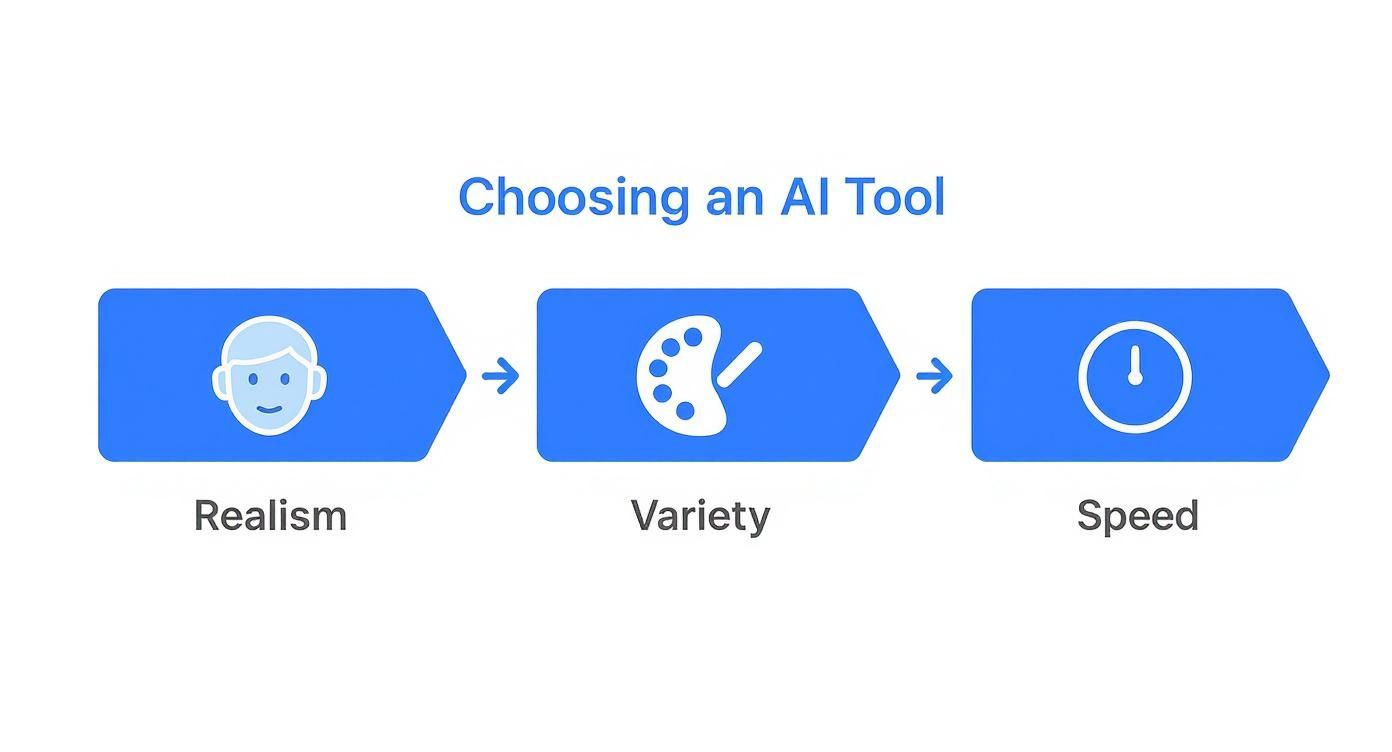
The best services nail this balance, giving you photorealistic quality and a ton of options, all delivered in a flash.
Step 4: Download Your Favorites
The last step is the simplest. Just pick your favorite high-resolution headshots and download them straight to your computer or phone. These images are now yours, ready to be deployed across all your professional channels—from LinkedIn to your company's "About Us" page.
Since you get a full commercial license, you have the freedom to use them however you see fit. What used to be a week-long ordeal with photographers and editors is now a simple, four-step process that puts you in complete control of your professional brand.
Common Concerns About AI-Generated Headshots
Jumping into any new technology brings up fair questions, and it’s smart to be skeptical. While the speed, quality, and low cost of AI headshots are obvious wins, you might still be wondering how it all really works. Is it ethical? Will it actually look like me? These are the right questions to be asking.
Let's tackle the biggest concerns people have when they're looking for the best AI headshot generator. We want to give you straight, clear answers so you can feel confident, knowing how the top platforms are solving these challenges.
Will My Headshot Still Look Like Me?
This is the number one question on everyone's mind: "Will the final picture be a real version of me, or some generic, airbrushed avatar?" It's a huge deal because a professional headshot is all about building trust and being recognizable. If it doesn't look like you, it's missed the point entirely.
The best AI headshot generators solve this by training a custom AI model on your specific facial features. You upload a dozen or so selfies, and the tech learns what makes you, you—the shape of your eyes, your unique smile, even the little expressions you make. This makes sure the final headshots keep your likeness, just dropped into a professional setting.
The result isn’t a touched-up selfie; it's a brand new image built from scratch with your face as the blueprint. Good tools aim for photorealism, steering clear of that "plastic" or overly smoothed look that screams fake.
What About AI Bias And Fairness?
Another major concern is all about fairness and representation. We’ve all seen stories about early AI models messing up when it came to different ethnicities, skin tones, and features, which naturally leads to worries about bias. This is something the industry takes very seriously because technology should work well for everybody.
Leading developers are making huge strides to get this right. The industry is tackling AI bias by training their core models on massive, diverse collections of images from people of all backgrounds. This improves the AI's ability to render everyone's features accurately and respectfully. For a deeper dive, check out the findings from the 2025 AI Headshot Industry Report.
Understanding The Usage Rights
Finally, there’s the practical stuff—ownership and usage. "Once I have my AI headshots, what can I actually do with them?" This is a critical detail, especially if you're using them for your business, marketing, or personal brand.
Reputable platforms keep it simple and give you clear terms. Here’s what you should look for:
- Full Commercial License: When you buy your headshots, you should get a full commercial license. This is your legal green light to use the images for any purpose you want, whether personal or for business.
- No Hidden Restrictions: You should be able to pop them on your website, LinkedIn profile, business cards, or even run paid ads with them without ever worrying about copyright strikes.
Always give the terms of service a quick scan, but trustworthy services like SelfieToPro make sure you get complete freedom and ownership over the images you paid for.
Why Professionals and Teams are Switching to AI Headshots
The real test of any new tool isn’t just what it does, but who it helps and why they’re switching. The move toward AI-generated headshots isn't just a tech trend; it's a practical solution to an old problem, offering unparalleled convenience, affordability, and quality for modern professionals and businesses.
The growth numbers are telling. The global AI headshot market is rocketing towards $500 million, a massive 150% leap from the previous year. This isn't just hype—it's driven by the undeniable time and cost savings that AI generators provide. You can dig into the data in the 2025 AI Headshot Industry Report.
For the Individual Professional
If you're an individual professional, an AI headshot generator is like having a branding expert on call 24/7. It solves an immediate need without the usual fuss, helping you present a polished, professional image online.
Here’s where it really shines for individuals:
- Job Seekers: A crisp, modern headshot on your LinkedIn profile can be the difference-maker for a recruiter. AI gives you that professional-quality look fast, without draining your budget.
- Entrepreneurs & Freelancers: When your face is your business, your image is everything. AI headshots let you create a consistent, professional vibe across your website, social media, and client proposals, saving you time and money.
- Consultants & Speakers: Staying current is part of the job. AI lets you refresh your headshot for that next conference bio or marketing push whenever you want, so you never look out of date.
The biggest win is simple: it cuts out the hassle. Forget a week of back-and-forth with a photographer. You get dozens of fantastic options in about an hour, for less than you'd spend on a decent dinner.
For Companies and Remote Teams
For businesses, especially those with remote or distributed teams, the value of AI headshots is a complete game-changer. Coordinating traditional photoshoots across different cities is a logistical and financial nightmare, often resulting in an inconsistent "About Us" page.
AI headshot generators are the perfect solution for creating brand harmony. An entire company can get unified, professional-quality headshots at a fraction of the cost and effort of traditional methods.
This approach delivers serious advantages for businesses:
- A Unified Brand Look: Every team member gets a headshot that shares the same style, background, and professional tone. This instantly strengthens your company's visual identity.
- Massive Cost Savings: Getting traditional headshots for a team of 50 could easily cost over $10,000. With a tool like SelfieToPro, that same team gets polished, consistent results for a sliver of that cost.
- Seamless Onboarding: A new hire can create their official company headshot from their home office on day one. It makes the whole onboarding process smoother and more welcoming.
In the end, whether you're a single professional building your personal brand or a manager creating a cohesive team identity, the best AI headshot generator offers a powerful, affordable, and incredibly convenient alternative to the old way of doing things.
Your Questions, Answered
Got a few last questions before you jump in? Perfect. Let's clear up some of the most common things people ask about AI headshot generators. My goal is to make sure you feel totally confident moving forward.
How Many Selfies Do I Really Need to Upload?
For the best, most realistic results, you'll want to upload somewhere between 10 and 20 good-quality selfies. But here's the key: it's not just about the number, it's about the variety. Giving the AI a good mix of photos helps it build a much more accurate model of your face.
Think of it like hiring a portrait artist. You wouldn't give them just one photo to work from, right? You'd give them a handful to capture your essence. You'll want to include:
- A few different angles of your face (straight-on, slight left/right profiles).
- A range of expressions, from your natural smile to a more serious, focused look.
- Different lighting, as long as your face is always clear and not hidden in shadow.
This variety is what ensures the AI really gets your unique features, making the final headshots look genuinely like you.
Can I Get Different Outfits or Backgrounds?
Absolutely! This is honestly one of the best parts. When you kick off the process, you get to choose from a whole library of professional styles. These styles dictate everything from your outfit to the background in the final images.
You can go for a classic dark suit in a traditional studio setting, a sharp blazer in a bright modern office, or even a more relaxed look. This lets you generate a full gallery of options for different professional situations, all from the same set of selfies.
Are These Headshots Okay for Passports or My Driver's License?
That's a really important question. The short answer is no. AI-generated headshots are not suitable for official government documents like passports, visas, or driver's licenses. Those documents have incredibly strict, specific rules about lighting, background, and even your expression that AI tools just aren't built to follow.
But for almost every other professional need? They're perfect. Use them for your LinkedIn profile, the company "About Us" page, your business cards, speaker bios, and all your professional social media. They deliver that polished, credible look exactly where it counts.
How Long Does It Take to Get My Headshots?
The turnaround time is a great mix of speed and quality. While some tools might promise "instant" results, the best ones take a little more time to get it right. You can typically expect your complete gallery of finished headshots within 30 minutes to a couple of hours.
This gives the AI enough time to properly train on your features and generate dozens of high-resolution, photorealistic options for you. Don't worry, you'll get an email the second they're ready to view.
Ready to skip the photographer and create your own studio-quality headshots in minutes? SelfieToPro makes the whole process simple, fast, and surprisingly affordable. Get your professional AI headshots today!